Defining Databases
- Explain the difference between DDL & DML in SQL
- Create and populate SQL tables
- Ensure data quality by defining database constraints.
- Improve query performance using indexes
Pre work
Set up
If nobody has done so already, copy and paste this command into Slack.
/prework Defining Databases
Watch - Acid Properties
Watch the video below on ACID properties:
Research - Defining Data
Find answers to the following questions:
- What is the difference between 'DML' and 'DDL' SQL?
- What options does Postgres provide for storing text values? Which is the best?
You do not need to share your answers, but be prepared to discuss them in the workshop.
Research - Constraints
Research the different types of constraints that can be applied to a Postgres table and column. For each, find out:
- What it does
- Why it is useful
- An example of how to use it
Share the examples in the Slack channel.
Workshop
Key Terms
Ask the trainees to share the definitions they found in the pre-work.
- DML: Data Manipulation Language, used to manipulate data in a database.
- DDL: Data Definition Language, used to define the structure of a database.
Database setup
Share this ERD with the trainees
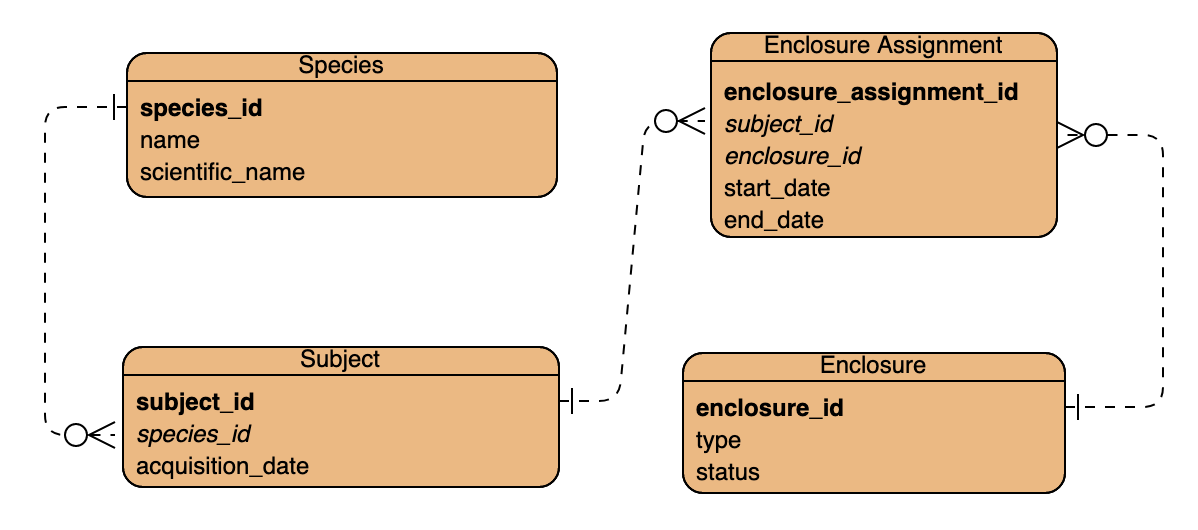
Ask them to guess what it is
Reveal after several guesses that it is in fact for Jurassic Park
Connect to postgres using psql.
Create a new database named jurassic_park.
Table definitions
Get trainees to tell you the minimal SQL to create some of the tables.
CREATE TABLE species (
  species_id INT,
  name VARCHAR(30),
  scientific_name VARCHAR(100)
);

CREATE TABLE subject (
  subject_id INT,
  species_id INT,
  acquisition_date DATE
);
Highlight the difference in names between the model and the SQL; explain the rationale behind your choices of names:
- All lowercase means less likelihood of later confusion
- Underscores instead of spaces ensure that the table names will work in most contexts without extra precautions
Ask trainees what problems this SQL might lead do/fail to prevent?
- Lack of primary keys could lead to data redundancy
- Duplicate IDs are possible
- Null values are allowed in every column
- No explicit foreign key relationship could lead to data errors
Callback to the idea of ACID properties and explain how these tables are not ACID-compliant.
Pose the question: why are these tables not ACID-compliant?
Add in some simple restrictions:
CREATE TABLE species (
  species_id INT GENERATED ALWAYS AS IDENTITY,
  name VARCHAR(30) NOT NULL,
  scientific_name VARCHAR(100) UNIQUE NOT NULL,
  PRIMARY KEY (species_id)
);

CREATE TABLE subject (
  subject_id INT GENERATED ALWAYS AS IDENTITY,
  species_id INT NOT NULL,
  acquisition_date DATE DEFAULT CURRENT_DATE,
  PRIMARY KEY (subject_id),
  FOREIGN KEY (species_id) REFERENCES species(species_id)
);
Explain the term 'constraint', and explain that primary/foreign keys, data types, and the use of UNIQUE/NOT NULL/DEFAULT are all examples of the same.
Constraints
Add a constraint to a table:
CREATE TABLE subject (
  subject_id INT GENERATED ALWAYS AS IDENTITY,
  species_id INT NOT NULL,
  acquisition_date DATE DEFAULT CURRENT_DATE CHECK (acquisition_date <= CURRENT_DATE),
  PRIMARY KEY (subject_id),
  FOREIGN KEY (species_id) REFERENCES species(species_id)
);
Demonstrate that invalid data fails the check by INSERTing a subject acquired next week.
Add a named constraint to a table, showing how this allows not just human-readable constraint names, but also multi-column constraints:
CREATE TABLE species (
  species_id INT GENERATED ALWAYS AS IDENTITY,
  name VARCHAR(30) NOT NULL,
  scientific_name VARCHAR(100) UNIQUE NOT NULL,
  PRIMARY KEY (species_id),
  CONSTRAINT no_human_subjects CHECK (
    LOWER(name) != 'human'
    AND LOWER(scientific_name) NOT LIKE 'homo %'
  )
);
Demonstrate what happens when you attempt to violate this constraint.
Highlight and rejoice at the park finally having at least one ethical guideline.
Highlight the value of constraints: a well-constructed database can ensure high-quality data.
Answer any trainee questions on constraints and related topics.
Challenge
Add the following two tables
CREATE TABLE enclosure_assignment(
    subject_id INT,
    enclosure_assignment INT,
    start_date DATE,
    end_date DATE
)

CREATE TABLE enclosure(
    type text,
    status text,
)
Challenge trainees to
- Ensure all data types are appropriate
- Ensure all primary and foreign keys are setup correctly
- Ensure that
statuscan only have 'available','occupied','maintenance' in it- Ensure all columns have good non-null settings and good defaults
- Ensure all dates are verified as being appropriate
- Add a
max_occupancycolumn, and ensure it is only set to a maximum of three- Ensure that type is not empty
- Ensure that a subject cannot be assigned to two enclosures at the same time
Performance
Load some dummy data into the database
INSERT INTO species
    (name, scientific_name)
VALUES
    ('Tyrannosaurus', 'Tyrannosaurus rex'),
    ('Triceratops', 'Triceratops horridus'),
    ('Velociraptor', 'Velociraptor mongoliensis'),
    ('Stegosaurus', 'Stegosaurus stenops'),
    ('Brachiosaurus', 'Brachiosaurus altithorax'),
    ('Apatosaurus', 'Apatosaurus ajax'),
    ('Allosaurus', 'Allosaurus fragilis'),
    ('Spinosaurus', 'Spinosaurus aegyptiacus'),
    ('Giganotosaurus', 'Giganotosaurus carolinii'),
    ('Archaeopteryx', 'Archaeopteryx lithographica'),
    ('Diplodocus', 'Diplodocus carnegii'),
    ('Compsognathus', 'Compsognathus longipes'),
    ('Ankylosaurus', 'Ankylosaurus magniventris'),
    ('Iguanodon', 'Iguanodon bernissartensis'),
    ('Pachycephalosaurus', 'Pachycephalosaurus wyomingensis'),
    ('Parasaurolophus', 'Parasaurolophus walkeri'),
    ('Oviraptor', 'Oviraptor philoceratops'),
    ('Therizinosaurus', 'Therizinosaurus cheloniformis'),
    ('Utahraptor', 'Utahraptor ostrommaysi'),
    ('Deinonychus', 'Deinonychus antirrhopus'),
    ('Carnotaurus', 'Carnotaurus sastrei'),
    ('Gallimimus', 'Gallimimus bullatus'),
    ('Troodon', 'Troodon formosus'),
    ('Maiasaura', 'Maiasaura peeblesorum'),
    ('Edmontosaurus', 'Edmontosaurus annectens'),
    ('Ceratosaurus', 'Ceratosaurus nasicornis'),
    ('Kentrosaurus', 'Kentrosaurus aethiopicus'),
    ('Suchomimus', 'Suchomimus tenerensis'),
    ('Plateosaurus', 'Plateosaurus engelhardti'),
    ('Corythosaurus', 'Corythosaurus casuarius'),
    ('Euoplocephalus', 'Euoplocephalus tutus'),
    ('Thescelosaurus', 'Thescelosaurus neglectus')
;

WITH species_data AS (
    SELECT 'Species ' || generate_series(1, 1000000) AS name,
                 'Scientific Name ' || generate_series(1, 1000000) AS scientific_name
)
INSERT INTO species (name, scientific_name)
SELECT name, scientific_name
FROM species_data;
Run the following query to see how long it takes to run:
SELECT DISTINCT s.name FROM species s;
Reflect that it seemed pretty fast, but that as engineers we should measure and not just feel.
Use explain to show the query plan:
EXPLAIN SELECT DISTINCT s.name FROM species s;
Observe that the query is doing a full table sequence scan, which is slow.
Ask the trainees to theorise why this is slow.
Explain that the database has to read every row in the table to find the one we want. We can use an index to make it use a more efficient method - a binary search.
Add an index to the species table:
CREATE INDEX species_name_idx ON species (name);
Run the query again and explain it.
Observe that the query is now using the index, which is much faster.
Ask the trainees to reflect on the performance difference and what the trade-off might be
- Indexes make reads faster but writes slower because the index has to be updated
- Indexes take up space because they are a separate data structure
Challenge
Task the trainees with
Write a SQL command for one of the other columns in the database to add an
index
Wrap-up
Encourage the trainees to realise that data models can always be extended and improved. There's no 'perfect', there is only 'good enough for our current needs'.
Discuss with the trainees approaches and issues encountered.